













Vision Help Articles
Merging Drivers
Occasionally more than one instance of the same driver can appear on Vision. This might happen when a driving licence is updated from a European to UK licence. Since the unique identifier (the driving licence number) doesn’t match, a new driver would be created. Similarly, a driver may have been created by adding a driver manually on Vision, but when the driver card data is uploaded information differs, so another driver is created.
When this happens, you can merge all the activities to be displayed and analysed under one driver.
The Merge Driver feature in Manage my drivers has always been available for this purpose, however we have now updated it so that you are in charge. This feature will no longer send a message to Tacho Support to carry out the procedure, instead you will be in control.
How to use Merge Driver
Merge driver is only available to those users with the Advanced editor role and above.
Go to Manage my driver and click “Merge”
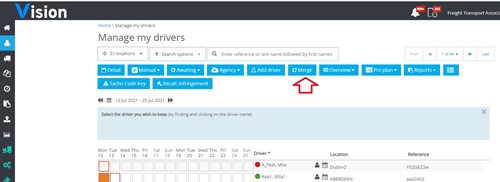
Then follow the instructions as illustrated in the Blue Box
1) Select the driver you want to keep- This is important. If the driver has changed their licence number you will want to keep the driver with the most recent data.
You can find the driver by using the search as normal:
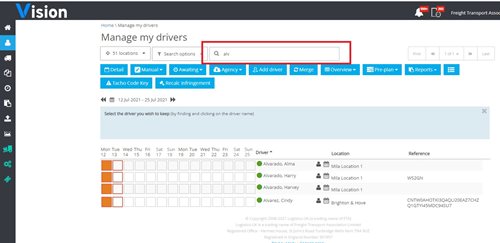
In this example I want to keep Harry Alvardo, so that is the driver I will pick first:
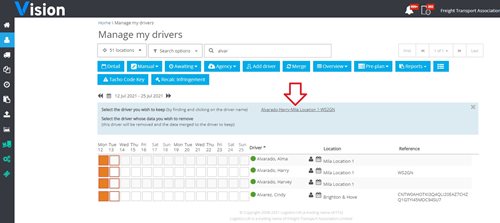
2) Now I pick the driver I want to remove, i.e. the driver I want to merge into the driver I want to keep.
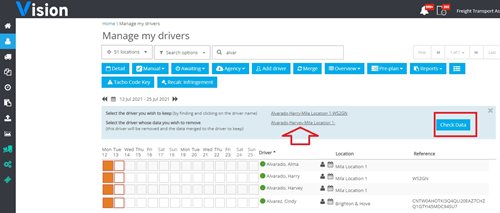
3) You will see a button to check data. This is there so you can see where clashes occur, i.e. where both drivers have data for the same day.In this example there are 14 clashes. The dates on which the clashes occur are shown, and the data to be kept is shown in green. Digital data is always king which means it over-writes any analogue or manual entries that occurred on the same days. Analogue data would overwrite manual entries, and where manual entries are on both drivers for the same day, the entry on the driver you want to keep will remain.
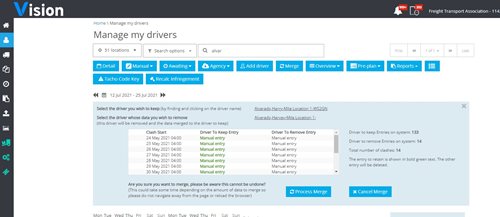
4) If you are happy with results of the merge click “Process Merge”. The driver you wanted to keep will remain on the Manage my driver screen.
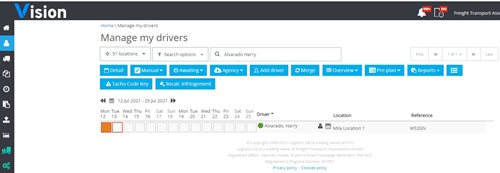
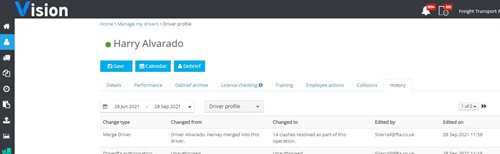
All data including driver debriefs will be moved over to the driver that is retained. The merge will be tracked in the history on the retained drivers’ profile.
More Vision Help Articles Articles



Related Pages
Check out more news and media
Discover More

Become a Member
Our membership packages provide you with the tools to keep your operation safe, efficient and compliant.
Learn more

Press Releases
Latest updates, insights, and expert commentary shaping the future of logistics, transport, and supply chains across the UK.
Learn more

Services
Discover the full range of services from Logistics UK, designed to keep your operation safe, efficient, and compliant.
Services

Events
Discover upcoming Logistics UK events designed to bring industry leaders, policymakers, and businesses together.
Events
Stay Ahead. Stay Compliant. Stay Connected.
Join thousands of logistics professionals using Logistics UK to navigate industry change with confidence.
Join Us