













Vision Help Articles
Mileage Dashboard
The mileage dashboard helps you monitor various key performance indicators (KPI’s) based on the vehicle unit data. The information monitored includes:
- Distance travelled with known card
- Distance travelled with unknown card
- Distance travelled with no card inserted, where a journey or driver is not assigned
- Distance travelled with no card inserted, where a journey or a driver is assigned
Using the Mileage dashboard
You can access the dashboard if you have the Advanced editor role or higher. Click Tacho dashboard and select Mileage:
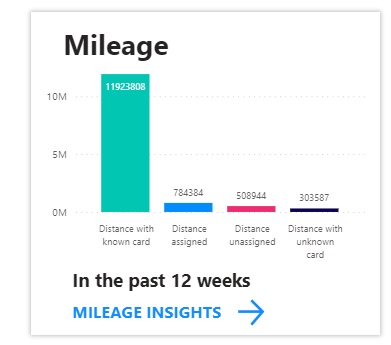
Click “Mileage insights” to access the dashboard:
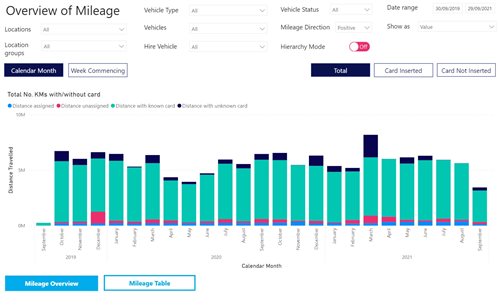
The overview page defaults to giving a summary of all the KPI’s for a 2-year date range. You can edit the screen to view results for a specific date range, location group, location and vehicle as well as amending the KPI you wish to view.
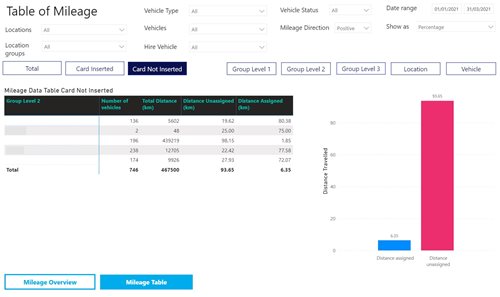
In the example below the dates have been altered to show information for the whole company from 1/1/21- 31/3/21 viewing “Card not inserted” information. Here we can see that the company has gradually had more instances of vehicles driven with no card inserted, with a large proportion of that data not being assigned. This information can be shown in KM’s or as a percentage:
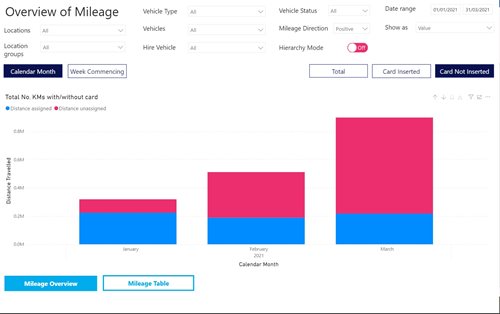
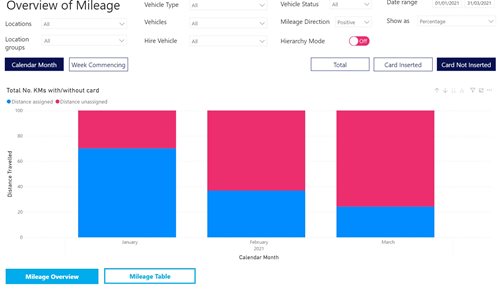
The information can also be changed to show information for reporting hierarchies if you have these set up.
The Mileage table gives a numerical view of performance against the KPI’s for a specific location group, location or vehicles displaying the information in KM’s or as a percentage.
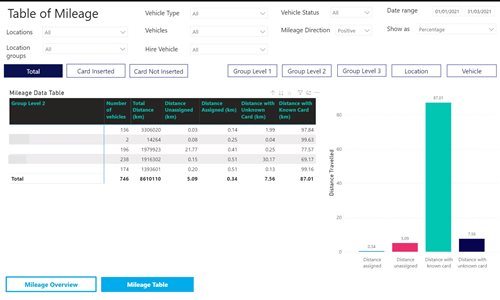
The table will update and adapt its columns according to which KPI is selected:
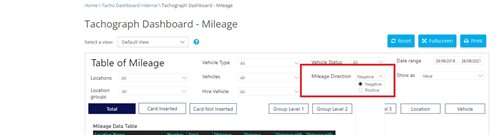
The Mileage direction dropdown will always default to positive, i.e. showing only positive mileage figures which is the norm. Occasionally a vehicle can show negative results usually caused by a mistake during calibration. Normally when selecting “negative” no data would be shown but we would suggest that you select the negative direction just to make sure there are no issues for your vehicles.
More Vision Help Articles Articles



Related Pages
Check out more news and media
Discover More

Become a Member
Our membership packages provide you with the tools to keep your operation safe, efficient and compliant.
Learn more

Press Releases
Latest updates, insights, and expert commentary shaping the future of logistics, transport, and supply chains across the UK.
Learn more

Services
Discover the full range of services from Logistics UK, designed to keep your operation safe, efficient, and compliant.
Services

Events
Discover upcoming Logistics UK events designed to bring industry leaders, policymakers, and businesses together.
Events
Stay Ahead. Stay Compliant. Stay Connected.
Join thousands of logistics professionals using Logistics UK to navigate industry change with confidence.
Join Us