













Vision Help Articles
Employee Reviews
Employee Reviews gives managers the ability to set reoccurring reviews and discussions with employees and drivers. Vision will automatically schedule, list topics for discussion, capture notes and outcomes, sign off for audit trails, and keep an evidenced record on file.
Like our other Vision features, this has security-based permissions to access and view. Review users’ security protocols to access or restrict authorisation.
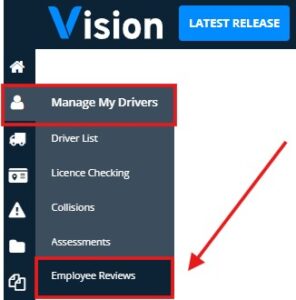
Employee Reviews is located under “Manage My Drivers”
Key Benefits
- Centralised visibility via dedicated Employee Reviews Hub
- Set automatic reoccurring reviews
- A section to highlight if a driver works for another company
- Dedicated medical reviews to future last health and eye test
- Secure – limited access who can view sensitive information
Employee Reviews Hub
This is the main landing page for employee review management. Users will be able to filter by location.
The Employee Reviews Hub will display reviews grouped by status:
- Overdue – Reviews past their due date and have not been completed
- Upcoming – Reviews are approaching their due date
- Awaiting sign-off – Completed reviews but waiting for sign-off
- Completed – Reviews fully completed and signed-off
Outcome levels provide an optional and configurable way of identifying employee risk across Vision.
A graph will also display the number of completed reviews per month.
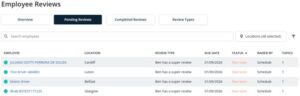
Pending Reviews
The Pending Reviews section will provide a view of reviews that require attention. Vision will show the review types that are due soon and overdue.
This allows managers and compliance users to quickly identify employees who have outstanding reviews.
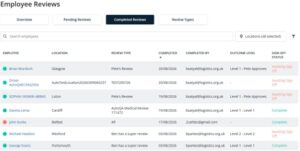
Completed Reviews
The Complete Reviews area will provide access to an employee’s historical reviews. This will display all reviews that have been signed off, giving authorise users a full record of completed reviews.
Review Types
The Employees Review tab will be available to users who have the appropriate permission.
This tab is the administration area for employees review tabs. User with require permission will be able to:
- Create new review types
- Edit existing review types
- Manage the review types available within Vision
Ad Hoc Reviews
Reviews can also be completed outside of the schedule dates using Ad Hoc Reviews.
Permissions
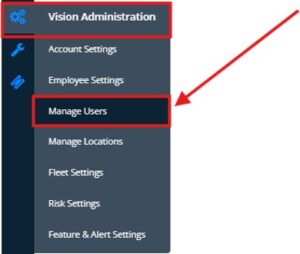
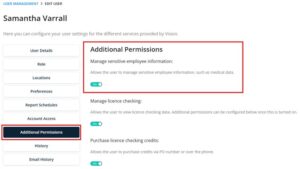
A toggle in the Manage User Settings will control which users can view sensitive information, such as medical reviews. This cannot be enabled by the users themselves; only users with access to Manage User settings can permit it.
This will be defaulted to off for all users.
To access, go to Manage Users -> click on named user -> Additional Permissions
More Vision Help Articles Articles



Related Pages
Check out more news and media
Discover More

Become a Member
Our membership packages provide you with the tools to keep your operation safe, efficient and compliant.
Learn more

Press Releases
Latest updates, insights, and expert commentary shaping the future of logistics, transport, and supply chains across the UK.
Learn more

Services
Discover the full range of services from Logistics UK, designed to keep your operation safe, efficient, and compliant.
Services

Events
Discover upcoming Logistics UK events designed to bring industry leaders, policymakers, and businesses together.
Events
Stay Ahead. Stay Compliant. Stay Connected.
Join thousands of logistics professionals using Logistics UK to navigate industry change with confidence.
Join Us