













Vision Help Articles
Automatically Make drivers Inactive
There is a new setting available in Vision that will allow you to automatically set your drivers status to inactive after a period where no new data has been received.
Using this setting will help you keep your account up to date and reduce the number of unnecessary upload alerts
Using the setting
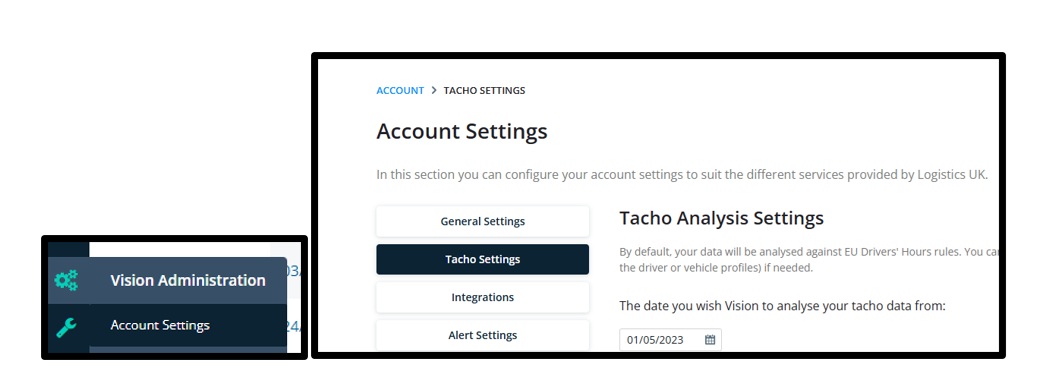
Select “Account Settings” and then go to “Tacho Settings”
Scroll to the bottom of the page and switch on the setting adding the period that should pass, where no new data has been received before the driver is made inactive:
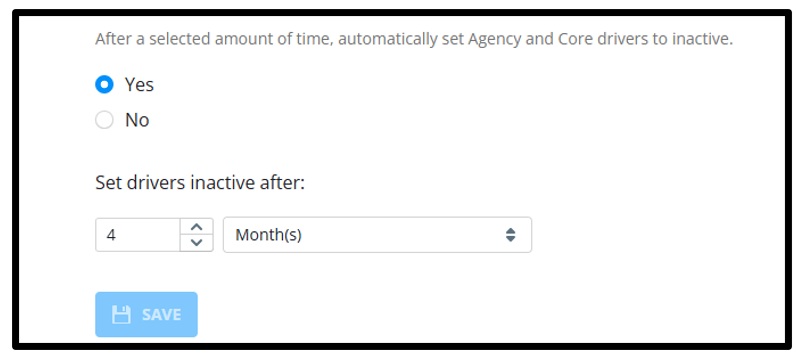
The process will begin immediately, but dependent on the number of drivers effected, may take an hour or so to complete.
More Vision Help Articles Articles



Related Pages
Check out more news and media
Discover More

Become a Member
Our membership packages provide you with the tools to keep your operation safe, efficient and compliant.
Learn more

Press Releases
Latest updates, insights, and expert commentary shaping the future of logistics, transport, and supply chains across the UK.
Learn more

Services
Discover the full range of services from Logistics UK, designed to keep your operation safe, efficient, and compliant.
Services

Events
Discover upcoming Logistics UK events designed to bring industry leaders, policymakers, and businesses together.
Events
Stay Ahead. Stay Compliant. Stay Connected.
Join thousands of logistics professionals using Logistics UK to navigate industry change with confidence.
Join Us