













Vision Help Articles
Weekly Rest Overlay
We've created a new option available in the driver calendar that shows how Vision has calculated daily rests and weekly rests. This enables you to understand where full and reduced rests are, which weeks they are attached to and where compensation has taken place.
To access this feature, go to the driver calendar and click Driver Calendar Preferences.
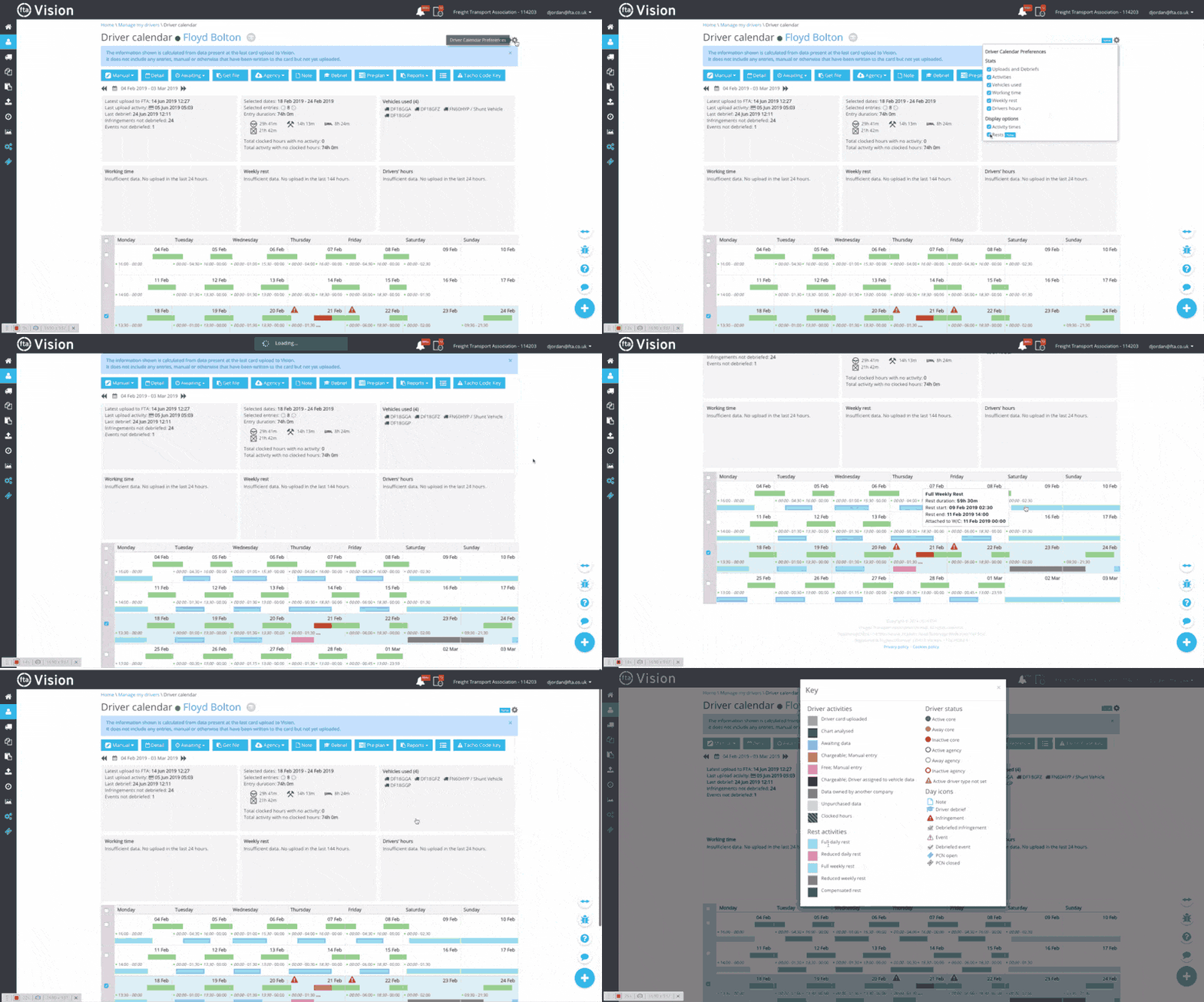
Coloured lines will show on the calendar which are defined in the key, hovering over each line will display a tooltip which explains what each of the lines mean. If there is no legal rest available there will be no line displayed between the shifts.
More Vision Help Articles Articles



Related Pages
Check out more news and media
Discover More

Become a Member
Our membership packages provide you with the tools to keep your operation safe, efficient and compliant.
Learn more

Press Releases
Latest updates, insights, and expert commentary shaping the future of logistics, transport, and supply chains across the UK.
Learn more

Services
Discover the full range of services from Logistics UK, designed to keep your operation safe, efficient, and compliant.
Services

Events
Discover upcoming Logistics UK events designed to bring industry leaders, policymakers, and businesses together.
Events
Stay Ahead. Stay Compliant. Stay Connected.
Join thousands of logistics professionals using Logistics UK to navigate industry change with confidence.
Join Us